Disclosure: As an Amazon Associate, I earn from qualifying purchases. This article includes affiliate links, which means I may earn a commission if you buy through them, at no extra cost to you.
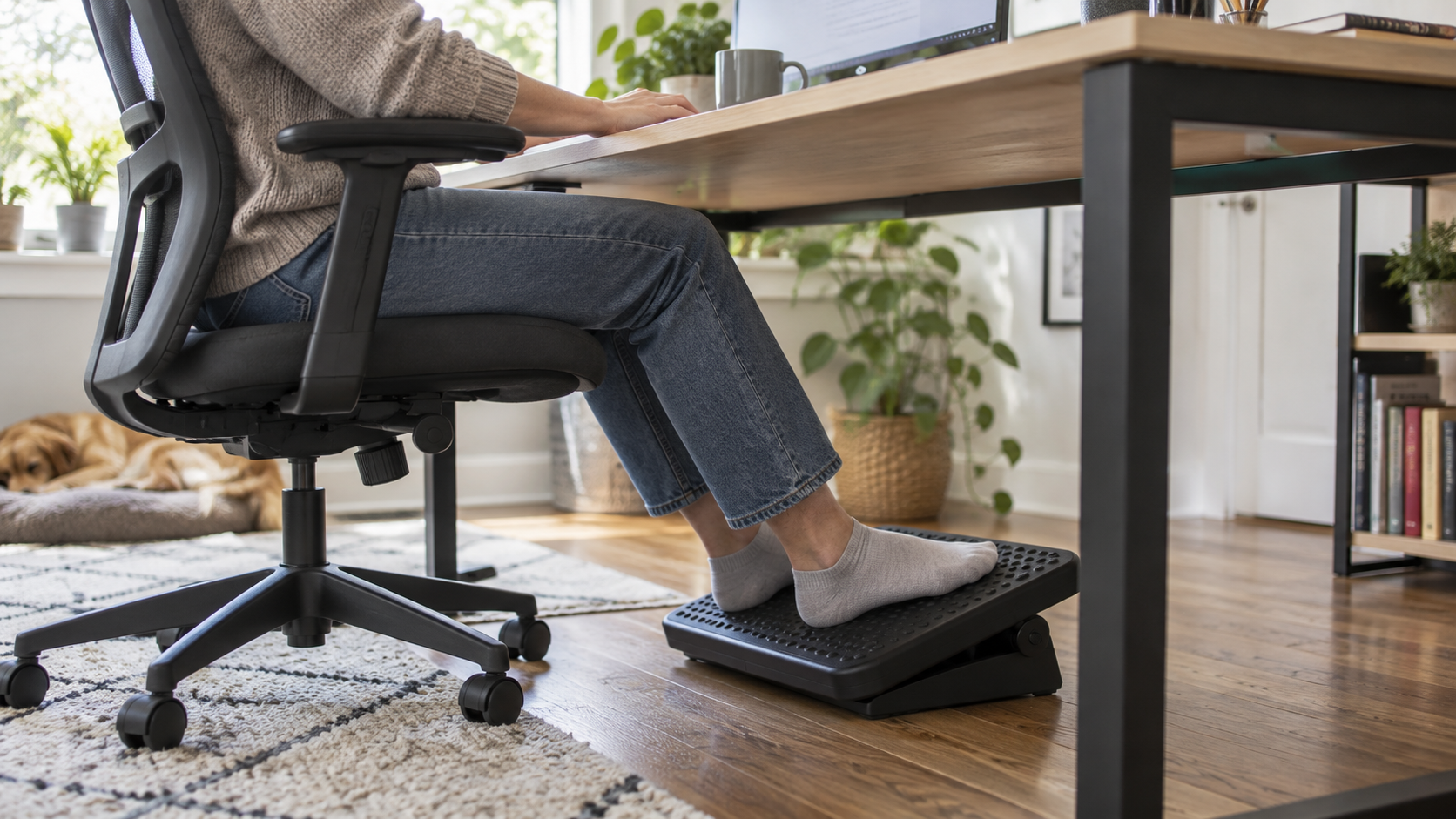
Check under desk foot rest ergonomic memory foam on Amazon
An under-desk foot rest can provide a stable surface when a chair is adjusted to the desk but the user’s feet do not rest comfortably on the floor. It is one part of a workstation setup and should be chosen for fit, adjustability, stability, and ease of movement.
This guide explains when a foot rest may be useful, how to measure the available space, and how foam, rocking, and adjustable platform designs differ.
Why You Need an Ergonomic Foot Rest
A foot rest gives the feet a supported contact point and may make it easier to use the chair back while keeping the desk at a practical height. Comfort and posture needs vary, and a foot rest does not diagnose, prevent, or treat back pain, swelling, circulation problems, or other medical conditions.
What to Look for in the Best Foot Rest
When browsing for an ergonomic foot stool for your office, keep these features in mind:
- Foam firmness: A foam rest feels softer under bare or socked feet, but it should be firm enough not to collapse during normal use. Compare dimensions and cover care rather than assuming memory foam is best for everyone.
- Non-Slip Bottom: There is nothing more annoying than a foot rest that slides away on a hardwood floor. Look for one with a textured, non-slip rubberized bottom.
- Removable, Washable Cover: Since it lives on the floor (and you might use it with bare feet), being able to unzip the cover and toss it in the washing machine is essential.
- Rocking option: Some curved designs allow gentle position changes. The motion should remain controlled and should not cause the feet or chair to slide.
Conclusion
A well-sized foot rest can make a workstation more adaptable when the floor is too low for the current chair and desk combination. It works best alongside regular position changes, suitable chair adjustment, and a desk layout that does not force the user to reach or twist.
Shop under desk foot rest ergonomic memory foam on Amazon
Related home office comfort guides
- Best desk organization products for small home offices
- Best under desk ellipticals for seniors
- Top home office and smart home upgrades for 2026
Start with Chair and Desk Height
Adjust the chair so the keyboard and mouse can be used with relaxed shoulders and forearms supported near the working surface. If that position leaves the feet without stable support, measure the vertical distance to the floor. A foot rest should fill part of that gap without pushing the knees sharply upward or pressing behind the thighs.
Measure the clear width and depth below the desk, including chair wheels, drawer units, and frame supports. The platform should be wide enough for both feet to change position and shallow enough that it does not block the chair from moving closer to the desk.
Foam, Rocking, and Adjustable Platforms
- Foam cushion: quiet and soft, but height is normally fixed and the material can compress over time.
- Rocking rest: supports small position changes, but may be distracting or unstable for some users.
- Adjustable platform: offers several height or angle settings and is easier to share between users, although it may require more space.
- Fixed rigid platform: provides a predictable surface and is simple to clean, but fit depends heavily on choosing the correct height.
Angle and Surface Grip
An angled platform can support the feet without requiring the ankles to hold one position. If the angle is adjustable, check whether it locks or rocks freely. A textured top helps footwear remain in place, while a stable base matters on both hard floors and carpet.
Non-slip materials still need testing on the actual floor. Dust can reduce grip, and a light foam unit may move when the user changes position. Stop using a rest that causes the chair, feet, or platform to slide unexpectedly.
Movement Still Matters
No foot rest makes prolonged sitting risk-free or comfortable for everyone. Change position regularly and stand or walk when appropriate for your work and health circumstances. Avoid keeping pressure behind the knees or sitting on one foot for long periods simply to reach the floor.
Persistent pain, numbness, swelling, weakness, or circulation concerns require advice from a qualified health professional. For individual workstation needs, an occupational health or ergonomics professional can assess the complete setup rather than one accessory.
Cleaning and Durability
A removable washable cover is useful for foam products, but confirm the washing and drying instructions. Rigid platforms should have accessible hinges and surfaces that can be wiped without trapping dust. Inspect adjustable mechanisms, seams, and non-slip pads periodically.
Compare the manufacturer’s stated dimensions with your measurements and read recent reviews for long-term compression, squeaks, slipping, or difficult adjustment. A return policy is particularly useful because comfort cannot be judged from dimensions alone.
Complete the Workstation
A foot rest addresses only lower support. Screen height, input-device placement, lighting, and cable routing also influence how easily the desk can be adjusted. Our guides to laptop stands for small desks and desk lamps for home offices cover two other common setup decisions.