Affiliate disclosure: As an Amazon Associate I earn from qualifying purchases. This guide uses affiliate links to Amazon.com.
Good cable management makes a desk easier to clean, keeps charging cords within reach, and reduces accidental pulling on plugs. The goal is not to hide every wire; it is to create clear routes that remain safe and easy to change when equipment moves.
The simple cable cleanup system
- Group cables by device.
- Hide the power strip.
- Lift extra cable length off the floor.
- Label cables you unplug often.
Planning before shopping: Start with Cable Management Basics for Home Offices to map cables, separate daily-use leads, and choose organizers that remain easy to maintain.
Cable management box
A cable box hides the power strip and bulky adapters. It works best beside a desk, TV stand, or nightstand where the power strip cannot be mounted underneath.
Search cable management boxes on Amazon
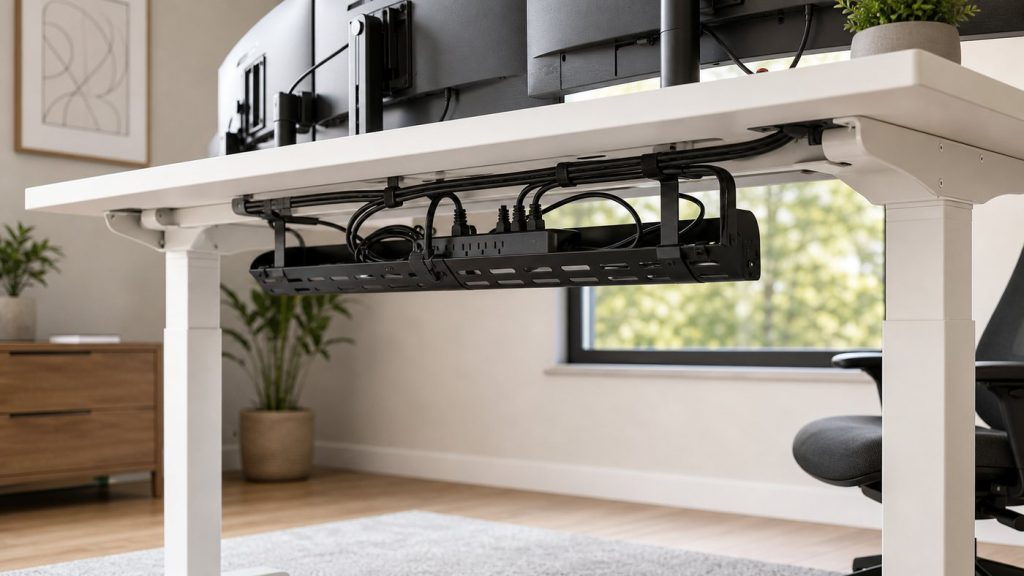
Under-desk cable tray
A tray is better than a box when your power strip stays under the desk. Look for metal construction, strong clamps or screws, and enough width for larger adapters.
Search under-desk cable trays on Amazon
Adhesive cable clips
Cable clips keep charging cords from sliding to the floor. They are cheap, small, and easy to place near the edge of a desk or nightstand.
Search adhesive cable clips on Amazon
Reusable cable ties
Reusable hook-and-loop ties are better than zip ties for a desk setup because you can change the layout later. They are also useful for travel bags and drawers.
Search reusable cable ties on Amazon
FAQ
Is a cable box or cable tray better?
Use a box when the power strip sits on the floor or beside furniture. Use a tray when the power strip can live under the desk.
How do I make cable management look clean?
Keep cables in straight runs, bundle extra length, and avoid mixing black and white cords in visible areas when possible.
Related desk organization guides
- Best desk organization products for small home offices
- Under desk cable management tray for small home offices
- Best cable management box for messy desk cords
Map the Cable Route Before Attaching Anything
Unplug nonessential equipment and place every device where it will normally be used. Identify the outlet, power strip, and the point where each cable reaches the desk. Keep power cables and frequently handled charging leads in separate groups so one can be moved without disturbing the other.
Leave a small service loop near monitors, laptops, and adjustable arms. A cable pulled completely tight can stress a connector when the screen or desk moves. Extra length should be bundled in a loose loop and supported in a tray rather than hanging from the port.
Cable Safety and Airflow
- Do not place a power strip inside a sealed container unless the product and its instructions allow that use.
- Keep adapters and power supplies away from liquids, fabric piles, and places where heat cannot escape.
- Never route a cable where a chair wheel, door, or desk mechanism can pinch it.
- Replace damaged cables instead of hiding worn insulation inside a sleeve.
- Follow the power strip manufacturer’s load limits and avoid connecting power strips to one another.
Fixed Desks and Sit-Stand Desks Need Different Plans
For a fixed desk, the shortest clean route usually runs from the desktop to a tray or power strip mounted beneath it, then down one desk leg to the wall outlet. A sit-stand desk needs enough slack for its full travel. Raise and lower the desk while watching every cable before fastening the final bundle.
Mount the computer and power strip to the moving part of the desk when practical so fewer cables need to flex. Keep one controlled vertical bundle for the connection to the wall and make sure it cannot catch on drawers or frame components.
Using Adhesive Clips Without Damaging Surfaces
Clean the mounting area and let it dry completely before applying adhesive. Test a hidden area first, especially on painted, veneered, or delicate furniture. Clips work best for light charging cables; a heavy power strip or large adapter should use hardware designed for its weight.
Plan the position before removing the backing because repeatedly lifting an adhesive pad weakens it. Leave the adhesive undisturbed for the curing time specified by its manufacturer before loading the clip.
Label Cables at the Useful End
Label cables near the power strip when several similar plugs need to be disconnected. Labels such as monitor, lamp, laptop dock, and speaker are more useful than device model numbers. At the desk edge, small clips can keep only the charging leads used every day accessible while the rest remain below.
Maintain the Setup
Check the cable route whenever a device is added or removed. Remove abandoned chargers, wipe dust from the power area, and confirm that ties are not crushing cables. A system that can be opened and changed is more useful than a perfect-looking bundle that has to be cut apart.



Leave a Reply